General Issues in Delphi Client/Server Development
Revised 6/3/97
Bill Wolf
Senior Developer
Professional Computer Solutions, Inc.
bill@billwolf.com
http://www.billwolf.com
Introduction
This paper will cover some important aspects of client/server development learned the hard way — in real world situations. It will include a brief overview of the client/server methodology and a discussion of why so many projects run in to difficulties as well as ways to avoid them.
One of the key points of this paper is to stress the need for a developer to be familiar with as many of the components of the C/S model as possible. Delphi makes it possible to easily move from local databases to SQL server databases. Many of the developers we work with are easily seduced by this aspect of Delphi. However this path is fraught with complications and oversights. Client/server applications are a different breed of system and require a very different mode of thought when designing and building them. Intimate knowledge of the server platform is the first priority. Next comes the ability to deal with the multitude of parts that go between your Delphi front end and the server. Then comes dealing with the way Delphi, BDE, and SQLLinks handle client/server.
This paper will also show techniques to work around problems inherent with client/server projects as well as weaknesses with Delphi. I will describe some custom components and techniques that I use to provide robust C/S systems using Delphi.
The examples in this paper use Delphi 2.0 except where indicated.
At a Glance
In this paper I will cover the following topics:
Contents
This paper details some of the more important concepts that the presentation contains. Refer to the PowerPoint slides or the audio tape for more information. Also feel free to contact me personally by e-mail at
This paper will discuss several issues where I wanted to get into more depth than I could in the presentation. There are also some concepts presented that might just be easier to read about than see demonstrated.
Overview
Client/Server is simply about dividing up the labor. Most C/S systems are made up of many pieces. Each piece can be optimized to suit its special task. The developer’s job is to decide which pieces get which tasks and then program each piece to carry out its task!
You must understand as many of the C/S building blocks as possible in order to determine the best development path. Especially the SQL Server. RAD is cool but you can’t build a decent sized system without a plan. And you are not prepared to design a system until you are dealing with known quantities. There are many different ‘pieces’ to the C/S puzzle as we’ll see.
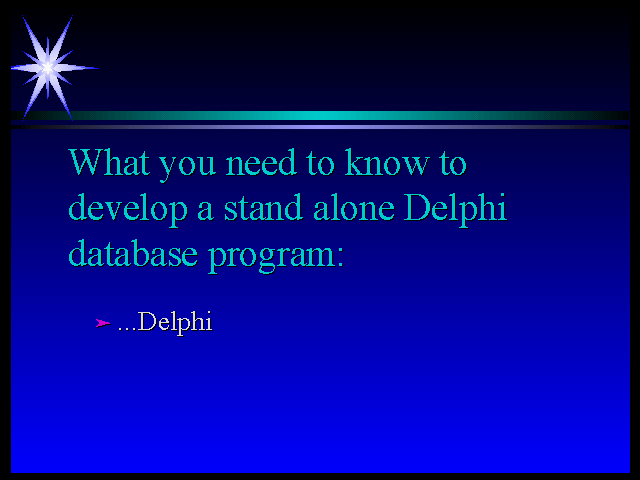
What you need to know to develop a stand alone Delphi database program...
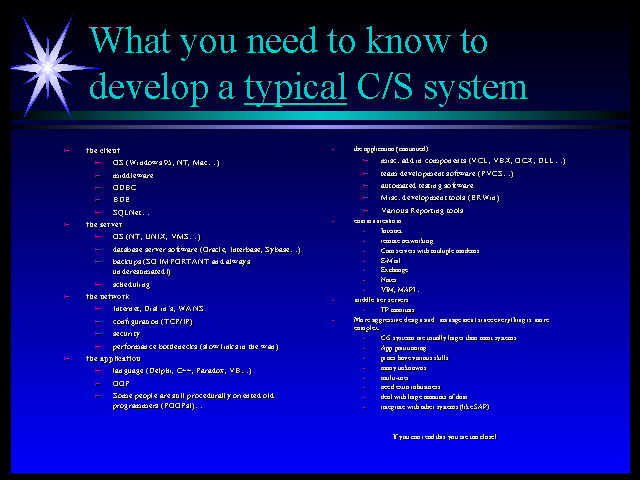
...What you may need to know to develop a typical C/S system!
(If you actually want to read what’s on that second slide, look at the PowerPoint slides on the Borland Conference proceedings! And keep in mind its only a partial list…)
If you only had Delphi on your machine you could build a variety of different types of systems. From products to utilities to multi-user databases — even communications packages or a superfast compiler with a component oriented development environment!
I build mostly database systems as do most of you. And before I built C/S systems, I built multi-user file server based systems. Building a large multi-user system using fileserver techniques (shared paradox files for example) is obviously possible. However the amount of work required to distribute the data, handle concurrency, provide robustness, and provide adequate performance quickly got out of hand.
Building a 100+ user F/S system requires an expert, a master craftsman so to speak. Note that this is not easily replicated by a team. A team is not a replacement for a highly skilled and experienced programmer. The ability to build such a system is usually connected to the very core of the system. That might take the form of a highly sophisticated design, a great deal of experience with the development tools, or too frequently — ingenious ‘tricks’!
Building a similar system using C/S techniques however doesn’t necessarily require the same depth of knowledge. It does require developers to have a more broad type of knowledge. There are many pieces that usually no one person knows. This ‘experience’ is easier to compartmentalize and can be better shared and distributed across a team. This is the primary reason that client/server is important. A craftsman may still be necessary to oversee the design and development — or get the team started — but the project is somewhat less dependent on him.
So Why Bother?:
Others:
And the #1 reason:
Looking under the BDE covers
In order to find bottlenecks, bugs, and in general just appreciate how Delphi works we need some ways to see behind the BDE curtains. Fortunately there are some ways to do this that we can see.
DBWIN
For Delphi 1.0 users there is an undocumented debugging feature built in to BDE that along with a simple utility, DBWIN, will let you capture the SQL code that is sent from BDE to your server. DBWin was distributed in the Windows SDK to help with debugging. There are numerous versions available on CompuServe with various people’s tweaks added to them. Essentially it is a stay on top window that BDE (and you) can send debugging messages to. You can enable it by setting a value in your WIN.INI file.
[IDAPI]
SQLTRACE=-1
{-1=trace all, 0= trace none(default), 1=don’t show prepare statements}
The first two examples show DBWin with Delphi 1.0. They use local Interbase for convenience. The Oracle output is similar.
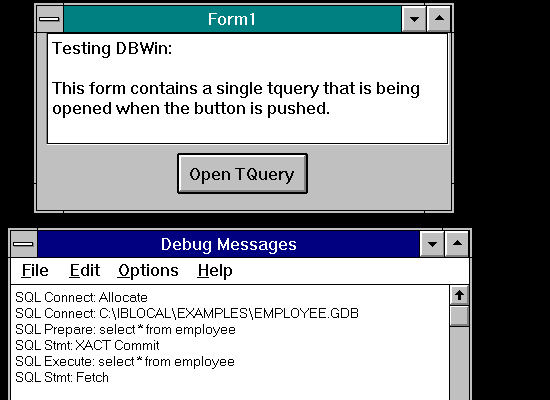
The above program just opens a Tquery against local Interbase. You can see the connection, query prepare request, execution of the query and the fetching of the results.
Lets look at a variation of the above example that opens the same tquery but this time has a tdatasource and a grid attached to the tquery. This should begin to show the value of seeing what’s going on behind the scenes.
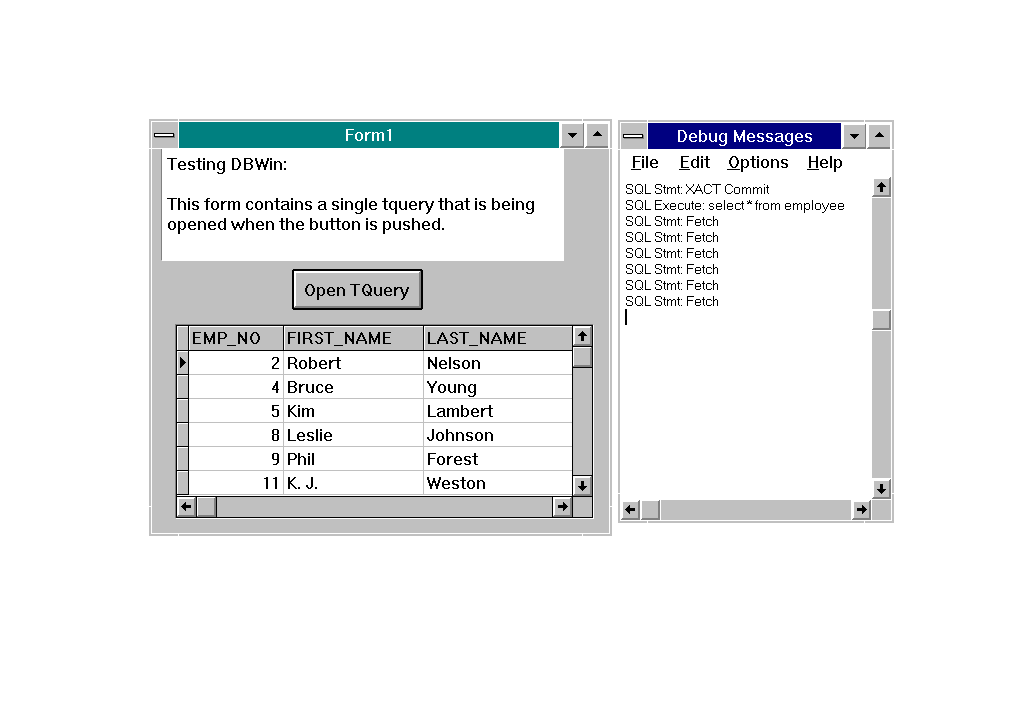
There are six records shown in the grid. Notice that there are six fetch statements in the debug window! Delphi just selects the data that it needs to display.
SQLMonitor
SQLMonitor is a utility that was added to Delphi 2.0 Client/Server edition and does essentially the same thing for the 32 bit BDE. DBWin doesn’t work with the 32 bit BDE. If SQLMonitor didn’t come with your version of Delphi, perhaps you could create your own 32 bit version of DBWin in C++ or Delphi. However I’m not sure how you tell BDE to send debug info to it. However SQLMonitor is one of a number of reasons that you should have the full edition of Delphi if you’re doing serious development.
SQLMonitor and DBWIN will show ODBC queries as well as any SQL server calls. So these utilities are useful for those of you that are using ODBC data sources such as MS Access files. It will not give you any information about internal data formats such as DBF and DB files.
Sending your own messages to the debug window
You can use the following function to send messages to the debug window at any time. This is a primitive example — you will want to make it more robust. This is the type of thing that should make you think about adding an application wide debug mode variable to your systems – perhaps set from an ini file so that you can turn it on and off without recompiling:
procedure writeDebugMessage( s : string ) ;
var
    pstring : array[0..255] of char ;
begin
    StrPCopy( pString, s+#10 ) ;
    OutPutDebugString( pString ) ;
end;
You can call it at any time such as:
if bDebug then writeDebugMessage( ‘Dev: Procedure BillCalc ran successfully’ ) ;
ODBC Trace
ODBC Trace is similar to DBWin/SQLMonitor but it is enabled through the ODBC Admin applet in the control panel. It has no visual window like the DBWIN but instead writes a log file containing the ODBC calls to your hard disk. There are a number of good utilities on the market that will let you capture the ODBC calls and do various things with them. The most interesting is to replay them! That would let you do some interesting server debugging like simulating high user loads.
Server Side utilities
Depending on your server software there probably are some ways to trap and trace the processing going on on the server side of things. There may also be third party utilities that will help.
Oracle has two very useful utilities. Explain Plan and TKPROF. These utilities allow you to spy on how the server handles the queries that you send it. They can be used to find poorly written queries and performance bottlenecks. A prime use is to determine if the indexing you have set up is effective. These two utilities are discussed in my Delphi/Oracle presentation and paper.
Ttables and Tqueries.
Lets take a close look at ttables and tqueries. Using DBWin and SQLMonitor we can trace the code that they cause BDE to generate and send to the server. These examples use Delphi 2.0 and Oracle except where indicated.
DBWin and Delphi 2’s SQLMonitor show the calls to the server but they do not show the results that the server returns. The updated SQLMonitor that ships with Delphi 3 C/S along with BDE 4.0 adds the ability to trace the results as well as the input parameter values that are passed to the queries. Yeah!
Since we can capture the output using these tools we can manually execute the statements using other interactive SQL tools such as Oracle’s SQLPlus. We can then see the results the various SQL statements produce. This way we can figure out what’s really going on inside BDE.
The accompanying demo project, TABVQRY, provides a test bed for examining how ttables and tqueries differ. It will allow us to try a variety of options who’s results we can capture using SQLMonitor and DBWin. [by the way, a disclaimer is in order: not being privy to the internal details of BDE, I can only speculate about some of what’s going on here]
First, lets look at the traced code for a ttable. The table that I’m using in the example is named TERRITORY and has two indexes. Also, keep in mind that this example uses Oracle. The queries will be different on other platforms.
But before going on, lets discuss some of the various types of statements in the trace:
There are various other commands that can appear in the log but these are the primary ones involved with ttables and tqueries. The number in the left column is the reference number for the SQL statement.
So lets look at the traced output of the ttable:
This first statement looks in a view in the Oracle data dictionary named sys.dba_objects which shows a list of all of the objects owned by all of the schemas in the database. This first query gets the object owner, name, and type — probably just to determine that it is in fact a table or view and that the user has access to it.
1 SQL Prepare: ORACLE - select owner, object_name, object_type, created from sys.dba_objects where object_type in ('TABLE', 'VIEW' ) and owner = 'SUPPORT' and object_name = 'TERRITORY' order by 1 ASC, 2 ASC

2 SQL Execute: ORACLE - select owner, object_name, object_type, created from sys.dba_objects where object_type in ('TABLE', 'VIEW' ) and owner = 'SUPPORT' and object_name = 'TERRITORY' order by 1 ASC, 2 ASC

3 SQL Misc: ORACLE - Set rowset size

4 SQL Stmt: ORACLE - Fetch

5 SQL Stmt: ORACLE - EOF

6 SQL Stmt: ORACLE - Close
Here’s the results of this query as captured by SQLCoder (this is a 3rd party utility that’s an interactive front end similar to SQLPlus):
OWNER OBJECT_NAME OBJECT_TYPE CREATED

-------- ----------- ------------ ---------

SUPPORT TERRITORY TABLE 30-MAY-96

(1) row(s) processed.
This next query looks for information about the structure of the table. There are 7 fields in the TERRITORY table therefore 7 records in the result set. 32 BDE gets them all in one fetch by adjusting rowset size. This seems to be a big improvement over 16 bit BDE which always fetches rows 1 at a time.
7 SQL Prepare: ORACLE - select column_name, data_type, data_precision, data_scale, data_length, nullable from sys.dba_tab_columns where owner = 'SUPPORT' and table_name = 'TERRITORY' order by column_id ASC
8 SQL Execute: ORACLE - select column_name, data_type, data_precision, data_scale, data_length, nullable from sys.dba_tab_columns where owner = 'SUPPORT' and table_name = 'TERRITORY' order by column_id ASC
9 SQL Misc: ORACLE - Set rowset size
10 SQL Stmt: ORACLE - Fetch
11 SQL Stmt: ORACLE - EOF
12 SQL Stmt: ORACLE - Close
Here’s the results:
COLUMN_NAME,DATA_TYPE,DATA_PRECISION,DATA_SCALE,DATA_LENGTH,NULLABLE…

TERRITORY_CD VARCHAR2 (Null) (Null) 5 N

INCIDENT_DATETIME DATE (Null) (Null) 7 N

ACTION_CD VARCHAR2 (Null) (Null) 2 N

NEED_CD VARCHAR2 (Null) (Null) 2 N

SEVERITY CHAR (Null) (Null) 1 Y

CALL_COMMENT VARCHAR2 (Null) (Null) 2000 Y

RESOLVED CHAR (Null) (Null) 18 Y

(7) row(s) processed.
By the way, 16 bit BDE would have done 7 different fetches instead of one. 32 bit BDE seems smarter at setting the number of records to get with each fetch operation. Minimizing the number of fetches should be more network efficient.
This next step gets a list of all of the indexes on the TERRITORY table.
13 SQL Prepare: ORACLE - select owner, index_name,
uniqueness from sys.dba_indexes where table_owner =          'SUPPORT' and table_name =     'TERRITORY' order by owner ASC, index_name ASC

14 SQL Execute: ORACLE - select owner, index_name, uniqueness from sys.dba_indexes where table_owner = 'SUPPORT' and table_name = 'TERRITORY' order by owner ASC, index_name ASC

15 SQL Misc: ORACLE - Set rowset size

16 SQL Stmt: ORACLE - Fetch

17 SQL Stmt: ORACLE - EOF

18 SQL Stmt: ORACLE - Close
The results are a list of all of the indexes on TERRITORY:
OWNER INDEX_NAME UNIQUENESS

--------------------------------------------------------------

SUPPORT XIE1TERRITORY NONUNIQUE

SUPPORT XPKTERRITORY UNIQUE
(2) row(s) processed.
Now BDE will get information about each of the indexes found in the above query. Since there are two indexes on TERRITORY, it will go through this process twice.
19 SQL Prepare: ORACLE - select column_name from
sys.dba_ind_columns where index_owner =        'SUPPORT' and index_name =     'XIE1TERRITORY' order by column_position ASC

20 SQL Execute: ORACLE - select column_name from sys.dba_ind_columns where index_owner = 'SUPPORT' and index_name = 'XIE1TERRITORY' order by column_position ASC

21 SQL Misc: ORACLE - Set rowset size

22 SQL Stmt: ORACLE - Fetch

23 SQL Stmt: ORACLE - EOF

24 SQL Stmt: ORACLE - Close

COLUMN_NAME

--------------------

LAST_NAME

MAIL_ZIP_CD
(2) row(s) processed.

25 SQL Prepare: ORACLE - select column_name from
sys.dba_ind_columns where index_owner =        'SUPPORT' and index_name =     'XPKTERRITORY' order by column_position ASC

26 SQL Execute: ORACLE - select column_name from sys.dba_ind_columns where index_owner = 'SUPPORT' and index_name = 'XPKTERRITORY' order by column_position ASC

27 SQL Misc: ORACLE - Set rowset size

28 SQL Stmt: ORACLE - Fetch

29 SQL Stmt: ORACLE - EOF

30 SQL Stmt: ORACLE - Close

COLUMN_NAME

--------------------

TERRITORY_CD
(1) row(s) processed.
BDE now requests a list of all of the non-nullable fields from the table - that is, fields that require some value.
31 SQL Prepare: ORACLE - select column_id from sys.dba_tab_columns where owner = 'SUPPORT' and table_name = 'TERRITORY' and nullable = 'N' order by column_id ASC

32 SQL Execute: ORACLE - select column_id from sys.dba_tab_columns where owner = 'SUPPORT' and table_name = 'TERRITORY' and nullable = 'N' order by column_id ASC

33 SQL Misc: ORACLE - Set rowset size

34 SQL Stmt: ORACLE - Fetch

35 SQL Stmt: ORACLE - EOF

36 SQL Stmt: ORACLE - Close

COLUMN_ID

--------------------

1
(1) row(s) processed.
Column_Id 1 refers to the territory_cd field that is the primary key of the table and the only one that will not allow nulls.
Now, finally, BDE requests the actual data in the territory table.
37 SQL Prepare: ORACLE - SELECT "TERRITORY_CD" ,"DISTRICT_CD" ,"SALUTATION_CD" ,"FIRST_NAME" ,"MIDDLE_INITIAL" ,"LAST_NAME" ,"MAIL_ADDR" ,"MAIL_CITY_NAME" ,"MAIL_STATE_CD" ,"MAIL_ZIP_CD" ,"MAIL_ZIP_PLUS4" ,"CCMAIL_ADDRESS" ,"EXCHANGE_ADDRESS" ,"PC_INFO" ,"USER_COMMENT" ,"LAST_CONTACTED" ,"CHANGE_DATE" ,"ROWID" FROM "TERRITORY" ORDER BY "TERRITORY_CD" ASC
38 SQL Execute: ORACLE - SELECT "TERRITORY_CD" ,"DISTRICT_CD" ,"SALUTATION_CD" ,"FIRST_NAME" ,"MIDDLE_INITIAL" ,"LAST_NAME" ,"MAIL_ADDR" ,"MAIL_CITY_NAME" ,"MAIL_STATE_CD" ,"MAIL_ZIP_CD" ,"MAIL_ZIP_PLUS4" ,"CCMAIL_ADDRESS" ,"EXCHANGE_ADDRESS" ,"PC_INFO" ,"USER_COMMENT" ,"LAST_CONTACTED" ,"CHANGE_DATE" ,"ROWID" FROM "TERRITORY" ORDER BY "TERRITORY_CD" ASC
39 SQL Stmt: ORACLE - Fetch
40 SQL Stmt: ORACLE - Fetch
41 SQL Stmt: ORACLE - Fetch
42 SQL Stmt: ORACLE - Fetch
43 SQL Stmt: ORACLE - Fetch
44 SQL Stmt: ORACLE - Fetch
45 SQL Stmt: ORACLE - Fetch
After all of these queries, we finally have our data. Seven queries in all for the TERRITORY table. If we had more indexes then there would be even more queries!
Notice the existence of the ORDER BY "TERRITORY_CD" ASC
statement. Territory_cd is the primary key of this table. This could cause a huge performance hit against Oracle if the table has been analyzed (ie you are using the Cost based optimizer). (This is discussed in my Delphi and Oracle paper).
BTW, Note that the last query — the one that actually gets the table’s records doesn’t have a set rowset size statement. As stated earlier this is because there is a blob field present. This lets us see something very revealing about BDE. There are 7 fetches for the last query. This is because there are 7 records displayed in the grid of the test program TABVQRY. BDE selects only as much data as it needs to fill the visual controls. If I resized the grid and recompiled, a different number of fetches would occur! I believe BDE is doing nearly the same thing even when it is using rowset size and a single fetch but since the trace does not show the value of the rowset, the details of this are hidden from us.
A ttable in 16 bit BDE
Below is the output captured from a ttable stored on Interbase. Note that the Interbase database dictionary objects are named differently than in Oracle and some of the statements are very different. However, in essence, the queries are serving the same function as the above Oracle trace — getting information about the table from the data dictionary. This is part of the power of SQLLinks — it handles the differences between servers while letting BDE behave in a consistent fashion to your application.
This test program opens a readonly ttable named EMPLOYEE which is attached to a grid displaying 10 rows of data. The output is captured using DBWin. I deleted everything but the first prepare since they’re the same as the execute statements.
First we get basic table info such as if its a view and who owns it:
SQL Prepare: select RDB$OWNER_NAME, RDB$RELATION_NAME, RDB$SYSTEM_FLAG, RDB$VIEW_BLR, RDB$RELATION_ID from RDB$RELATIONS where RDB$RELATION_NAME = 'EMPLOYEE'

SQL Execute: select RDB$OWNER_NAME, RDB$RELATION_NAME, RDB$SYSTEM_FLAG, RDB$VIEW_BLR, RDB$RELATION_ID from RDB$RELATIONS where RDB$RELATION_NAME = 'EMPLOYEE'

SQL Stmt: Fetch

SQL Stmt: Fetch

SQL Stmt: EOF

SQL Stmt: XACT Commit

SQL Stmt: Close
Next we get the field layout of the table:
…
SQL Execute: select R.RDB$FIELD_NAME, F.RDB$FIELD_TYPE, F.RDB$FIELD_SUB_TYPE, F.RDB$DIMENSIONS, F.RDB$FIELD_LENGTH, F.RDB$FIELD_SCALE, F.RDB$VALIDATION_BLR, F.RDB$COMPUTED_BLR, R.RDB$DEFAULT_VALUE, F.RDB$DEFAULT_VALUE from RDB$RELATION_FIELDS R, RDB$FIELDS F where R.RDB$FIELD_SOURCE = F.RDB$FIELD_NAME and R.RDB$RELATION_NAME = 'EMPLOYEE' order by R.RDB$FIELD_POSITION ASC
SQL Stmt: Fetch
SQL Stmt: Fetch
SQL Stmt: Fetch
SQL Stmt: Fetch
SQL Stmt: Fetch
SQL Stmt: Fetch
SQL Blob IO: Get Len (SCHEMA)
SQL Stmt: Fetch
SQL Blob IO: Get Len (SCHEMA)
SQL Stmt: Fetch
SQL Blob IO: Get Len (SCHEMA)
SQL Stmt: Fetch
SQL Stmt: Fetch
SQL Blob IO: Get Len (SCHEMA)
SQL Stmt: Fetch
SQL Stmt: Fetch
SQL Stmt: EOF
SQL Stmt: XACT Commit
SQL Stmt: Close
Now we get the list of index files (there are 4: Interbase’s SQLLinks appears to add an extra fetch for each query):
…
SQL Execute: select RDB$INDEX_NAME, RDB$UNIQUE_FLAG, RDB$INDEX_TYPE from RDB$INDICES where RDB$RELATION_NAME = 'EMPLOYEE' order by RDB$INDEX_ID ASC

SQL Stmt: Fetch

SQL Stmt: Fetch

SQL Stmt: Fetch

SQL Stmt: Fetch

SQL Stmt: Fetch

SQL Stmt: EOF

SQL Stmt: XACT Commit

SQL Stmt: Close
Now it gets the layout of each index found above:
…

SQL Execute: select RDB$FIELD_NAME from RDB$INDEX_SEGMENTS where RDB$INDEX_NAME = 'RDB$PRIMARY7' order by RDB$FIELD_POSITION ASC

SQL Stmt: Fetch

SQL Stmt: Fetch

SQL Stmt: EOF

SQL Stmt: XACT Commit

SQL Stmt: Close

…

SQL Execute: select RDB$FIELD_NAME from RDB$INDEX_SEGMENTS where RDB$INDEX_NAME = 'NAMEX' order by RDB$FIELD_POSITION ASC

SQL Stmt: Fetch

SQL Stmt: Fetch

SQL Stmt: Fetch

SQL Stmt: EOF

SQL Stmt: XACT Commit

SQL Stmt: Close

…

SQL Execute: select RDB$FIELD_NAME from RDB$INDEX_SEGMENTS where RDB$INDEX_NAME = 'RDB$FOREIGN8' order by RDB$FIELD_POSITION ASC

SQL Stmt: Fetch

SQL Stmt: Fetch

SQL Stmt: EOF

SQL Stmt: XACT Commit

SQL Stmt: Close

…

SQL Execute: select RDB$FIELD_NAME from RDB$INDEX_SEGMENTS where RDB$INDEX_NAME = 'RDB$FOREIGN9' order by RDB$FIELD_POSITION ASC

SQL Stmt: Fetch

SQL Stmt: Fetch

SQL Stmt: Fetch

SQL Stmt: Fetch

SQL Stmt: EOF

SQL Stmt: XACT Commit

SQL Stmt: Close
Now we get some validation information about the fields such as whether they are nullable.
…
SQL Execute: select R.RDB$FIELD_NAME, F.RDB$VALIDATION_BLR, F.RDB$COMPUTED_BLR, R.RDB$DEFAULT_VALUE, F.RDB$DEFAULT_VALUE, R.RDB$NULL_FLAG from RDB$RELATION_FIELDS R, RDB$FIELDS F where R.RDB$FIELD_SOURCE = F.RDB$FIELD_NAME and R.RDB$RELATION_NAME = 'EMPLOYEE' order by R.RDB$FIELD_POSITION ASC
SQL Stmt: Fetch
SQL Stmt: Fetch
SQL Stmt: Fetch
SQL Stmt: Fetch
SQL Stmt: Fetch
SQL Stmt: Fetch
SQL Stmt: Fetch
SQL Stmt: Fetch
SQL Stmt: Fetch
SQL Stmt: Fetch
SQL Stmt: Fetch
SQL Stmt: Fetch
SQL Stmt: EOF
SQL Stmt: XACT Commit
SQL Stmt: Close
Finally, it fetches the data:
…
SQL Execute: SELECT EMP_NO ,FIRST_NAME ,LAST_NAME ,PHONE_EXT ,HIRE_DATE ,DEPT_NO ,JOB_CODE ,JOB_GRADE ,JOB_COUNTRY ,SALARY ,FULL_NAME FROM EMPLOYEE ORDER BY EMP_NO ASC
SQL Stmt: Fetch
SQL Stmt: Fetch
SQL Stmt: Fetch
SQL Stmt: Fetch
SQL Stmt: Fetch
SQL Stmt: Fetch
SQL Stmt: Fetch
SQL Stmt: Fetch
SQL Stmt: Fetch
SQL Stmt: Fetch
What is revealing is that 16 bit BDE always does a fetch for every record it receives. Also to reiterate: BDE gets only the data it needs. If I replace the grid with a single tdbedit, there will be only 1 fetch for the last query!
Understanding this is key to understanding how and when BDE fetches data when you or your user is navigating through tables. When the user moves past the fetched records, more records will be fetched. If the user pressed the down arrow key while on the last displayed record in the grid, a single fetch will occur. If they press the page down key, another 10 fetches will be done!
TQueries
Here’s the complete BDE 32 trace of a readonly (requestLive:=false) tquery that contains the following SQL statement: "select * from TERRITORY". This example uses Oracle.
1 SQL Prepare: ORACLE - select * from TERRITORY

2 SQL Execute: ORACLE - select * from TERRITORY

3 SQL Blob IO: ORACLE - Return blob data

4 SQL Stmt: ORACLE - Fetch

5 SQL Stmt: ORACLE - Fetch

6 SQL Stmt: ORACLE - Fetch

7 SQL Stmt: ORACLE - Fetch

8 SQL Stmt: ORACLE - Fetch

9 SQL Stmt: ORACLE - Fetch

10 SQL Stmt: ORACLE - Fetch
Seems pretty simple doesn’t it! If we explicitly name the fields we want and exclude the BLOB fields in our query we get these results:
1 SQL Prepare: ORACLE - select LAST_NAME,… from TERRITORY

2 SQL Execute: ORACLE - select * from TERRITORY

3 SQL Misc: ORACLE - Set rowset size

4 SQL Stmt: ORACLE - Fetch
Important! If you change a Tquery’s RequestLive property to True then the trace results are the same as that of a ttable!
So if you want to open readonly files you’d be wise to use tqueries instead of ttables wherever possible. That might mean giving up some components that are built to use ttables and not tqueries.
There are other conclusions we can draw from these results. If you need to use a ttable for lookup values and that table contains BLOB fields then you should use a Tquery just so that you can tailor the select statement to exclude the blob fields. Besides bringing down smaller records, 32 bit BDE will be able to get the same data in less fetches. TTables bring down all of the fields — even if you create tfields for only a subset of the fields in the table.
Keep in mind that these details are not trivial when you are using a WAN or a dialup. They are amplified by the slower performance.
More about ttables and tqueries
Schema Caching
If you open a ttable (or a live tquery) more than once during a single session, then BDE does not request the data dictionary information on successive ttable.open events. It remembers the dictionary data in a schema cache. If the data is stored in the cache then the table opens much more quickly since there is just one query now — the one that gets the actual data. Server side processing is faster too since the SQL statement is already compiled and loaded into system memory.
Here’s the results of opening a ttable against the territory table of our first example for a second time:
1 SQL Prepare: ORACLE - SELECT "TERRITORY_CD" ,"DISTRICT_CD" ,"SALUTATION_CD" ,"FIRST_NAME" ,"MIDDLE_INITIAL" ,"LAST_NAME" ,"MAIL_ADDR" ,"MAIL_CITY_NAME" ,"MAIL_STATE_CD" ,"MAIL_ZIP_CD" ,"MAIL_ZIP_PLUS4" ,"CCMAIL_ADDRESS" ,"EXCHANGE_ADDRESS" ,"PC_INFO" ,"USER_COMMENT" ,"LAST_CONTACTED" ,"CHANGE_DATE" ,"ROWID" FROM "TERRITORY" ORDER BY "TERRITORY_CD" ASC
2 SQL Execute: ORACLE - SELECT "TERRITORY_CD" ,"DISTRICT_CD" ,"SALUTATION_CD" ,"FIRST_NAME" ,"MIDDLE_INITIAL" ,"LAST_NAME" ,"MAIL_ADDR" ,"MAIL_CITY_NAME" ,"MAIL_STATE_CD" ,"MAIL_ZIP_CD" ,"MAIL_ZIP_PLUS4" ,"CCMAIL_ADDRESS" ,"EXCHANGE_ADDRESS" ,"PC_INFO" ,"USER_COMMENT" ,"LAST_CONTACTED" ,"CHANGE_DATE" ,"ROWID" FROM "TERRITORY" ORDER BY "TERRITORY_CD" ASC
3 SQL Stmt: ORACLE - Fetch

4 SQL Stmt: ORACLE - Fetch

5 SQL Stmt: ORACLE - Fetch

6 SQL Stmt: ORACLE - Fetch

7 SQL Stmt: ORACLE - Fetch

8 SQL Stmt: ORACLE - Fetch

9 SQL Stmt: ORACLE - Fetch
Delphi 2 has the ability to save the schema information after your application exits. You can set the following parameters to control this. Be sure to check out the SQLLNK32.HLP file stored in the BDE directory for more information.
From the Borland SQLLNK32.HLP file:
ENABLE SCHEMA CACHE
Specifies whether the BDE caches table schema locally for tables residing on SQL servers. This enhances performance for table opens. Set SCHEMA CACHE DIR to the directory in which the local cache is stored.
Default:
FALSE (No local schema caching)
SCHEMA CACHE TIME
Specifies
how long table list information will be cached. (In BDE table information is
cached when you call either DbiOpenTableList or DbiOpenFileList.)
Setting this value can increase performance for table and file list retrieval.
Possible modes and their meanings are listed here.
Setting Meaning
-1
The table list is cached until you close the database. (Default)
0
No table lists are cached.
1
through 2147483647 The table list is cached for the number of seconds specified in the setting.
SCHEMA CACHE DIR
Specifies
the directory in which the local schema cache is stored.
SCHEMA CACHE SIZE
Number of SQL tables whose schema information will be cached.
Possible values:
0 – 32
Default:
8
Try adding these parameters to the tdatabase on the demo project: TABVQRY and see the effect. An scache.ini file will be created in the directory that holds the cache as well as the cache file.
A problem with schema caching is that if the table structures change, or indexes are added or renamed, your cache will be obsolete. This could cause a variety of odd problems. So to use this means that you either have to know that your schema will not change or you will have to put some sort of version control into your application to force a schema refresh when you do database updates.
Tquery.Prepare and Parameterized Queries
As we’ve seen in our traced code, queries get prepared. This means that the server compiles and optimizes the query if it is not already cached in memory. Not all servers support prepares. But on servers that do, such as Oracle, all queries that get sent to the server get prepared.
When you open a tquery, a prepare is always done. However the tquery object has a prepare method. This method sends the query to the server — which is what opening the query does too. [in some cases, the prepare method also does other things — such as if our tquery is live — then it fetches all of the data dictionary information] The reason you might want to explicitly do a prepare rather than rely on tquery.open’s doing it implicitly, is if you want to open the query more than once.
You can get a small performance boost by doing an explicit prepare in advance — such as on a form.create event. The tquery.prepare forces the query to be prepared on the server but does not execute the query. When you call tquery.open, BDE goes right to the execute and skips the prepare. This is useful if you are opening and closing your query within a loop.
Note that if you change the SQL statement, the query needs to be re-prepared. Make sure you query.unprepare it first if you did an explicit query.prepare. You don’t have to unprepare a query if you just relied on query.open.
Parameterized (tquery.params) queries take advantage of the fact that changing the query means that it has to be re-prepared. They let you specify values at runtime that won’t force the query to be prepared each time. The query itself stays the same — just the parameters change. When the query is re-executed, the server is aware that it just needs to plug in the new values. TstoredProc works much the same way.
You don’t want to prepare a query over and over as you can cause some odd errors! By the way, the traces also show that ttables get prepared however there is no way to explicitly prepare them.
Filters
Filters are a way to hide a subset of your data. Delphi 2 supports filters in both tables and queries. However they behave very differently in each. I added a filter to the tquery used above by doing the following:
query1.filter.add( district_cd <> 643);

query1.filtered := true ;
Here are the results:
1 Log started for: Tabvqry

2 SQL Prepare: ORACLE - select * from TERRITORY

3 SQL Execute: ORACLE - select * from TERRITORY

4 SQL Blob IO: ORACLE - Return blob data

5 SQL Stmt: ORACLE - Fetch

6 SQL Stmt: ORACLE - Fetch

7 SQL Stmt: ORACLE - Fetch

…

483 SQL Stmt: ORACLE - Fetch

484 SQL Stmt: ORACLE - EOF
BDE fetched 479 records — all of the data in the table (the line#’s include the 5 non-fetch statements). But it only displays 471 records (there are 8 district_cd ‘643’ records). So the tquery filters the records locally. That is, the records are filtered out after they have been fetched.
Lets look at how the ttable does it. I added the same filter and traced the following results (the first 37 lines of the trace select the data dictionary information that we’ve already seen):
38 SQL Execute: ORACLE - SELECT "TERRITORY_CD" ,"DISTRICT_CD" ,"SALUTATION_CD" ,"FIRST_NAME" ,"MIDDLE_INITIAL" ,"LAST_NAME" ,"MAIL_ADDR" ,"MAIL_CITY_NAME" ,"MAIL_STATE_CD" ,"MAIL_ZIP_CD" ,"MAIL_ZIP_PLUS4" ,"CCMAIL_ADDRESS" ,"EXCHANGE_ADDRESS" ,"PC_INFO" ,"USER_COMMENT" ,"LAST_CONTACTED" ,"CHANGE_DATE" ,"ROWID" FROM "TERRITORY" WHERE ("DISTRICT_CD" <> :1) ORDER BY "TERRITORY_CD" ASC
39 SQL Stmt: ORACLE - Fetch

40 SQL Stmt: ORACLE - Fetch

41 SQL Stmt: ORACLE - Fetch

42 SQL Stmt: ORACLE - Fetch

43 SQL Stmt: ORACLE - Fetch

44 SQL Stmt: ORACLE - Fetch

45 SQL Stmt: ORACLE – Fetch
It only fetched 7 records because we’re only displaying 7 records in our grid which right away tells us that something different is happening here.
The TTable does not filter the data locally. It filtered the records before fetching them – that means it did it on the server. It did this by adding a parameterized where clause to its query before executing it. In this case: "WHERE ("DISTRICT_CD" <> :1)". So filtering is done on the server for a ttable.
This brings up a subtle but important problem. If the column that is being filtered on the server has some NULL values in it, those values will always be exluded from the result set! But the records that contained blanks that were filtered by BDE locally in our TQUERY exemple did not get excluded.
According to standard SQL behaviour, if you have a where clause on a column where there are NULL values, those records are always excluded. But the rules for local filters are different — as seen above, the nulls are kept.
This has other BDE ramifications as well.
If you are using the MAX ROWS database parameter, keep in mind that it will apply to prefiltered tquery results (since filtering is done locally after the fetch). So if max rows is set to 100 (5 of which will not pass your filter, and 30 have nulls in the filtered column), you will retrieve 100 records. You will then filter 5 out. The nulls will not be removed so you will be left with 95 records.
For ttables, since filtering is done on the server, MAX ROWS will retrieve 100 records. But remember as described about that those records won’t include the the filtered records or the null column ones.
This also affects the ttable.rowcount and tquery.rowcount results. Ttable.rowcounts will not include the blanks and the tquery.rowcounts will.
So keep these details in mind and be careful when using filters!
I generally prefer to use Tqueries wherever I can and use ttables very little. The primary reason is that I have more direct control over what is happening. I will have to write more code sometimes but it’s a trade off that is usually worth it.
Editable Results
Getting editable result sets is not hard in tqueries. The SQL statement needs to conform to local SQL syntax. Unfortunately that can be fairly limiting. You can frequently get around this using two tqueries. The first one can do as complex a query as you want. When the user selects the record they want to edit — say by double clicking on a record in a grid — you trap the event and pass the key field values to a second tquery that does a simple select using the key. You can then edit that second dataset. That’s it in a nutshell, I may write a more detailed description of that technique in the future.
Using Cached Updates and TUpdateSQL
Delphi 2.0 added the ability to suspend the posting of changes to a datasource allowing a type of transaction control. This feature occurs at the tdatabase level, so it can be used for SQL servers as well.
However I prefer using the transactional capabilities on the server rather than using cached updates. But for local databases they are a very welcome feature.
Navigating Large Record Sets
Lets look at an application with an interface and flow similar to the following. We have a main query by form interface where the user can fill in any criteria they wish. When they press the Select button we create the where clause of a query and execute it. The user sees the results in a grid on the search results form.
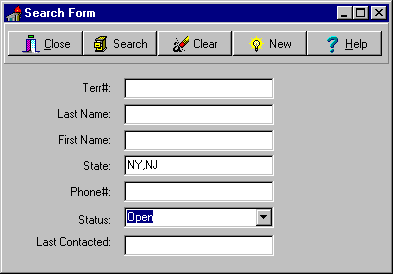
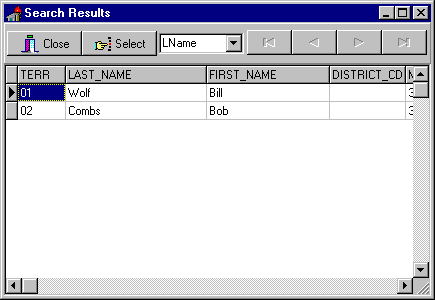
The user has complete freedom to enter either a very narrow criteria such as one that looks for a specific Territory# in the tedit box generating:
select * from TERRITORY where TERR_CD = ‘123’
(Terr# is a unique key in this table)
or they can enter ‘S..’ on the last_name tedit box generating:
select * from TERRITORY where last_name like ‘S%’
Because of this the user can easily select a very large set of records that will be displayed in the grid. If the user leaves all of the criteria blank and press the search button, the query: "select * from table" will be executed.
As we’ve seen, just a few records will actually be retrieved at first — just enough to fill the grid. And if the query is simple they will be returned quickly. But this sets the stage for a potentially serious problem. I’ll show some workarounds for it in a moment. First lets look at what BDE does with our query.
When you make a query active, BDE sends the SQL code to the server which parses and then executes it. No records are returned yet. BDE requests records only if it needs to. If you have a datasource and some data bound components (tdbedit, tdbgrid,…) then BDE fetches only a small batch of records to fill the bound controls with data. If the where clause in the query (i.e. the user’s criteria) is simple then the first batch of records can be brought down instantly.
So if the user does a select * from all_people_in_us where lastname=’SMITH’ (and last_name is indexed) then records are returned immediately. If you let them browse the records in a grid as in the form above, when they navigate past the last record BDE fetched, BDE goes and fetches the next batch of records. You can see the SQL cursor flash briefly. Press the page down button or the next record button and you’ll bring down more and more records. Using DBWin or SQLMonitor — BDE monitoring tools — you can see behind the scenes and see the fetch statements as they execute.
These records are now buffered locally by BDE. You can page up to the top of the table and then page down with no fetches sent to the server until you get to the last buffered record. Once the record is buffered it doesn’t need to be re fetched.
Now lets look at the worst case scenario. What if the user presses the Ctrl-END key while on the grid or the end of table button on the navigator? BDE will have to fetch every record in the query result set. For select * from all_people_in_the_usa where lastname=’SMITH’ this could be over a million records. BDE will start fetching records and there’s no way for the user to stop it. Their machine will just seem hung. To make matters worse, BDE will sometimes crash — often crashing Windows — after getting less than one hundred thousand records.
The user could also instigate this situation by nudging the scrollbar down. Since it’s always at the top, bottom or in the middle for an Oracle table (remember there’s no concept of position) its confusing. If the user nudges the scroll bar a bit to far — bang! - your application starts heading for the end of the table.
So the solution that probably has come to you is to figure out how many records there are before letting the user browse the results. You could even display a message that says "too many records, go and refine your search criteria".
Well unfortunately when you do a tquery.recordcount BDE does exactly what pressing the Ctrl END key did — it starts fetching every record with no way to interrupt it. Remember that SQL is set oriented — there’s no simple concept of a record count. BDE counts the records in a tquery result by selecting them first!
For 16 bit Delphi, all of this applies to ttables as well. But in Delphi 2.0, there are a couple of differences. The ttable now does a select count(*) query when you call the recordcount method. However, select count(*) queries are generally slow since the server will count all of the records but this is better than retrieving the records and having BDE count them. Also, in ttables, if you press the end key, BDE somehow skips to the records near the bottom of the table. However all of the records in the middle of the table are still unretrieved at this point.
So if you need to do local processing, determine the recordcount, or allow the user to browse the result set, then you’re open to get this potentially devastating performance hit. The recordcount method is not much help and you can’t risk the user hanging or crashing their machine.
MaxRows
BDE 3.0 adds a new tdatabase property called MaxRows that can help prevent this seemingly endless select. This new setting for Delphi 2.0 acts as a type of governor for all of your queries. It makes sure that no more than n rows are returned with any query.
But let’s see how this works. If you have a query that matches 1001 records and you have max rows set to 1000, the result will contain only 1000 records. Also, tquery.recordCount will report 1000 records. If you move to the end of the query you will be on the 1000’th record — you can not move to the 1001’st record. Your code will think you are at the end of the table.
The Delphi help file states that if you attempt to fetch more than maxrows, then an exception will be generated. But I’ve found that exceptions are not generated for most operations where you would expect them, such as when doing a fetchall. It just limits the size of the result set. (at least against Oracle)
I suppose maxrows could be useful as a safeguard if set to a fairly high number like ’20,000’. If you set it too low then the queries that BDE issues to get data dictionary information may not return all of the needed records. If that happens then your application could be highly unstabilized. So I find this setting limited and do not generally make use of it. (Besides this setting would be more useful if it existed at the ttable/tquery level so it could be varied for each dataset.)
TQueryFetch
The solution we’ve been using is a component called TQueryFetch. This component is a descendant of tcomponent and works when paired with a TQUERY (or a descendant such as TwwQuery), to give a pseudo interruptible query. Its purpose is to combine executing a query with fetching the records.
It relies on the fact that once records have been fetched BDE buffers them. And you can move around buffered records very quickly. It’s just the first time you access records that is slow. BDE caches the records for you so it doesn't need to return to the server.
This component is a way to help the situation. It starts out by merely executing a query in the standard way (I don’t know of any way to interrupt the initial execution of the query on the server). The component then scans the open query in a loop and just does a query.next to iterate through the records. This fetches the records one at a time.
In between the iterations of the loop, it maintains a progress dialog (and a counter) and allows the user to interrupt the loop. If the user interrupts record fetching, you can control whether the query stays open (and is only partially buffered — and partially protected) or is closed, using a property.
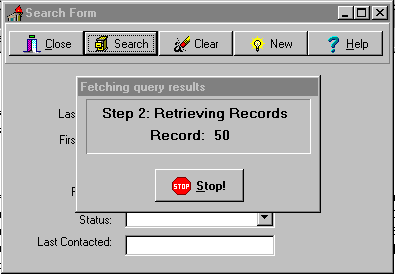
The end result is that the user is aware of what is happening, can interrupt the operation, and is protected. Unfortunately, the user has to wait until all of the records are fetched but this is a small price to pay. This technique was designed to work with an add-hoc query system. If the user selects too many records, then they can cancel the query, and refine their search criteria.
The component is quite simple. It paints the progress form, then activates the query, then iterates through the results, doing an application.processmessages to allow the cancel button to be pushed. Here’s the central logic:
while ( not fquery.eof and formworking.bContinue ) do begin
fquery.next ;
inc( i )  ;
{ process msg every fIncRecordCount rows }
if i mod fIncRecordCount = 0 then begin
formworking.lRecord.caption := inttostr( i ) ;
application.processMessages ;
end;
end
The key method is called Execute. There are a just a few simple properties that should be self evident.
MaxRecords = # ; specifies the maximum number of records to fetch before auto-canceling the fetch operation. Set it to -1 for no maximum.
DisplayDialog = true ; shows the working form. (with this set to false there is no way to cancel the query except if it exceeds the maxrecords property)
CloseOnCancel = true ; will close the query if they press the stop button or press the escape key.
Interruptible = true ; specifies that the fetch operation can be canceled.
IncRecordCount = # ; specifies the number of records to fetch before updating the dialog's counter.
DialogCaption = string ; is the caption displayed on the progress form.
EnableFetch = True ; this specifies if the component does the fetch after opening the query. If False, it just opens the query.
Perhaps someday SQLLinks or SQLNet will have a way to really cancel queries. But for now this solution is working for our users.
Delphi 2.0 adds an OnServerYield event that you can trap. Unfortunately it does not support Oracle Server. I believe it only works with the newest version of Sybase.
Data Binding and Lookups
Where should you keep data while you are working with it?
Database applications primarily use two types of data:
Primary data is what we all write applications to handle — orders, inventory, paycheck information, etc. If you can get away with editing 1 record in a single table at a time then your job is fairly simple. Delphi gives this to you easily.
It will handle the following automatically:
But business and users are generally more sophisticated. The business ‘commodity’ that they want to work with often can’t be broken down into 1 table at a time. They usually want something like the following:
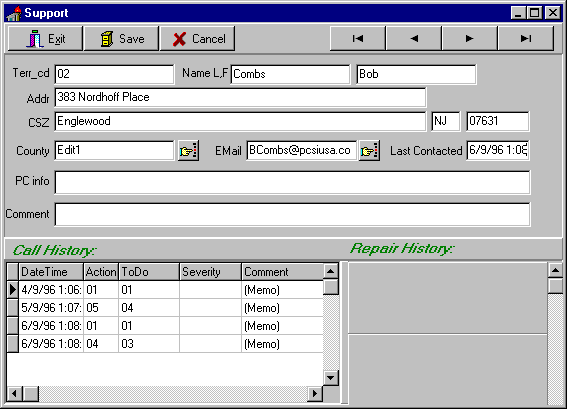
There are several linked tables on this form. The main user information, support call history, and repair history. The detail tables are linked to the master table (user info). If the user makes any changes to anything on this form — they might expect that the SAVE and CANCEL buttons apply to everything. Since Delphi by default applies updates record by record this would be impossible without special handling which we’ll discuss in a moment.
Lookups
Another issue that you have to deal with on a more complex form such as this are the lookup features. The form has a button for County and E-Mail. There also are lookups for State and several of the fields in the Call_history grid. How to handle the lookups depends on how much data there is. This influences how you might present the lookup data. There are several thousand counties — you would not use a combo box to display them. You would probably want to be able to narrow the search by other fields in the county lookup table such as state. So the county lookup should probably be a custom form.
Some programmers see lookups like COUNTY as opportunities to use local Paradox tables. There are several problems with doing this. With the large number of counties you would not want to bring down the entire table every time you start your application so you would have to build a versioning mechanism. That is, only refresh the local data when it changes. And what happens if the lookup data changes after you started the application? You would also need to store this data locally — what if it wasn’t counties in the US but 200,000 city names? The footprint (disk space) of your application could become quite large.
Another problem with this approach is that if you allow users to modify lookup data or add to it then you need to write code to update the server’s copy of the data as well. Also, you don’t know what lookup tables the user will utilize so you need to update all of them which may turn out to be a waste of the user’s time.
We’ve had good results storing all lookup data on the server. PCSI has built a 1000+ user Paradox/Sybase system that stores all of its lookups in this way. The performance hit — even considering that some of the same lookups are fetched frequently by a user — is minimal. Some people are shocked by this practice. They tend to consider every fetch of the server a drain on its resources and every byte sent over the network a waste of bandwidth. What’s funny is that these people often store most of their applications on the network. Executing programs can use a lot more bandwidth then selecting data from the server. Besides frequently accessed data on the server gets cached in the server’s memory.
Bandwidth isn’t always the biggest problem with SQL queries. For lookup tables we’re dealing with small amounts of data. The devil is network latency. That’s the time it takes the network to get any data to you. It is the lag time that the bits take to get from one machine to the next. This might not be trivial. If the user has to wait 2 seconds as they move from field to field, that is too slow. Latency might be the speed of routers, network jumps, network traffic, -- even the speed of light comes in to play for very long distances.
Client/server development means dealing with these issues. If the latency is very high, then you need to work with the network people to see if it can be lessened. If not, then you may have to store some data locally. Or maybe you can populate lookup controls when you start your application.
But I always set out initially to keep data on the server when possible. I feel the advantages of this approach outweigh the negatives. Users have up to moment data, the local footprint is smaller, and data is only retrieved when it is needed by the user.
Doing this in Delphi is pretty straightforward. Just use tqueries to populate your lookup forms, lists, combo boxes — whatever mechanism you use to display the data. Tqueries go against live server data (not live in the editable sense). If you choose to populate a listbox or combobox then you can open the query, iterate through the records and then close the tquery.
Combo Boxes
Elsewhere I described some differences between ttables and tqueries. Non editable Ttables have considerable more overhead when opening then Tqueries. They issue multiple queries to get table and index information from the data dictionary. When you open tqueries they just issue a single select statement to the server which can of course have any type of far out SQL you care to put in it. That means that you have the power of SQL to create any type of lookup data set.
Some components such as the TDBLookupcombo can only use a ttable. This limits their usefulness drastically. I’d rather use the DBCombobox and manually add to the items property. Its fast and flexible.
query1.open;

dbComboBox1.items.clear ;

while not query1.eof do

dbComboBox1.items.add( query1.fieldbyname( ‘State’ ).asString ) ;

end;
For small lookups (say < 100 records) comboboxes (either TComboBox or TDBCombobox) work well. Although there are enough other weaknesses with all of the Delphi comboxes that I try to not use them. There are some excellent third party controls available on the internet that have features such as columns, hidden columns (for storing codes), incremental search, etc.
If you use the Infopower controls note that some of them rely solely on ttables too.
For larger lookups you may want to provide a way to do a sub-select of the records. If you have a CUSTOMER table with 10,000 entries, then you don’t want to use a combobox! The ideal component for searching large lookup tables would be a search dialog that used a tquery, allowed narrowing the set of records, and supported flexible sorting of results. You could also add event trapping to allow inserting records. I would have built an example for you but I was too busy playing Quake! You will have to do this yourself. Please just send me a copy …
One last thing about lookups, if the values that you want to display never change then just hard code them into the application. There’s no reason to store them in a table.
The ties that bind…
Consider the master detail form shown earlier. How can you provide a Save or Cancel feature that applies to the entire form? Or how do you do some form of complex validation that needs to look at changes to multiple records in multiple tables before saving? There are several different ways to accomplish this. Lets take a look at using the following:
Unbound controls
This is similar to how VB apps are coded. You manually fill your editboxes and string grids with results of your queries. Since they are not bound to the server tables they represent, you have full control over what gets done with them to post or cancel changes. This is of course a lot of work. You give up a big advantage of using a product like Delphi when you do this. There are instances where it is appropriate. Performance can be very fast this way.
Local Tables
Another way is have local data tables (Paradox, dBase, Access) that are identical to the server tables that you are editing. When you open your edit session, you make sure the local tables are empty then you insert the data you want to display. Your Delphi application then goes against the local data NOT the server’s. When the user wants to save changes, you validate, then post the data back to the server. This technique was quite common with Paradox DOS C/S applications. The advantage is that data can stay around if the user crashes the application. Or you could build things so that the user can come back the next day to his local data.
Storing data locally is a start towards decoupling your application from the server. If your users are remote this could have some benefits. You could build the app so that they log in and fetch the data from the server and then log out and modify it. This might be more common when cellular packet networks become more widespread.
The Lonnggg Transaction
If you edit against the server using ttables and tqueries directly, you can use the server’s transaction mechanism to provide a save/cancel feature. Start a transaction just before the user changes data. When they’re done you either do a COMMIT or a ROLLBACK. The disadvantage of this is that transactions can use a great deal of server resources if you’re making a large number of changes.
Cached Updates
Finally, Delphi 2.0 offers some relief with the addition of cached updates. This feature is similar to the long transaction approach but does not involve the server. Instead, BDE stores all of the changes you make to all of the datasets (new records, deleted records, updates) and posts them in one big block when you tell it to. This method looks to be pretty easy and has the most promise.
Looking at these different techniques illustrates why we like using Delphi. It’s so flexible!
Building Multiserver support into your application
Developing an application has three major phases: implementation, testing, and support. Your development environment should allow for this. To facilitate this on the front end you simply use multiple source code directories: i.e. Dev, Test, and Prod. Database servers are a little different.
The server is the foundation for your application. The data structures primarily, are what you build an application on top of. Changes made in the database ripple through the entire application.
I'm sure that it’s clear that you should not be developing against a production server. You can't make modifications that might affect the production system of data. You might make a mistake that compromises important data. Consequently you can't do much useful debugging.
Even if you used separate schemas on one server to handle modifying data, you could still not protect against using up server resources. A poorly constructed query might tie up or crash the entire server — something your users will not be happy about. So your production server should not be compromised with test and development activities.
There are also advantages of doing testing and development against separate servers. The first is that testing involves simulating (although usually in a scaled down manner) the production environment. Testers need some continuity in their data. They often need to construct elaborate test cases and sample data so a developer can't change things as much as he might need to. A test environment is by nature somewhat stabilized. You're concentrating on tuning your application — not making huge changes. But while testing is going on, your development effort is usually moving ahead. That might mean needing to make wide sweeping changes that you could only do on a development machine.
Another advantage of having a good test machine is that if there is a problem with production the test machine can be used as a substitute. If money was no object you might want a test machine that was identical to your production server.
In a pinch, testing and development can be done on the same server but if possible spend the money on the extra box. Many of the popular SQL servers can be set up on relatively modest machines. Our Dev machine is an old 486 33 PC with a triple speed CPU add-in running Oracle NT. It does have a fast SCSI drive though. Your budget and mission criticality of your application will drive this decision.
Supporting Multiple Servers
You don't want to have separate builds of your application for each server. You want to be able to change the server or user_id that you log in as, outside of your application. The best way to do that is by using an INI file.
Here's a sample startup procedure
uses …, inifiles ; { must include this unit to use ini files }

type
TForm1 = class(TForm)
Private
{ Private declarations }
public
{ Public declarations }
end;
var
Form1 : TFndGrow1;
{/// these are application global variables ///}
gs_serverAlias : string ;
gs_user_id, title : string ;
gb_debug : boolean ; { tracks whether we're in debug mode }
gb_sessionTrace : boolean ; {enables Oracle's tracing capabilities}

implementation
…

procedure TForm1.FormCreate(Sender: TObject);
var
   ini : TIniFile ;
begin
{Get user information from the SUPPORT.INI file}
ini := tiniFile.create( 'support.ini' ) ;
ServerAlias := ini.readString( 'server','Server_Alias','SuptOra' ) ;
user_id := ini.readString( 'server','user','ERROR' ) ;

{set Debug mode global indicator}
bDebug := ini.readBool( 'salesrep','debug', false ) ;

{ the session privatedir is where the BDE stores various private objects. If you don't
set it, BDE sets it to where the exe was started from which could be on the network. }
try
   session.PrivateDir := ini.readString(  ‘server', 'privateDir','c:\windows\temp' );
except
   if bDebug then showmessage( 'Private directory was not set' ) ;
end;

bSessionTrace := ini.readBool( 'server','sessionTrace', false ) ;
ini.free ;

with databaseOracle do begin
  Connected:=False ;
  AliasName := serverAlias ;
  params.Values['USER NAME'] := user_id ;
  Params.Values['PASSWORD'] := copy( user_id, 0 ,1 ) ;
  {not much security here!}
end;

try { to log in… }
  DatabaseOracle.Connected:=True; { Log in }
Except
  on e : EDBEngineError do begin
    MessageDlg( 'Can''t start system: ' + e.message,
      mtError, [mbOK], 0 ) ;
    Halt ;
end;

if bSessionTrace then begin
  wwQuery1.sql.clear ;
  wwQuery1.sql.add( 'alter session set sql_trace true' ) ;
  wwQuery1.execsql ;
end;

end;
Well that’s all there is for now. Enjoy and good luck. Feel free to contact me at the address at the top of the paper if you have any questions or comments.