Revised 6/3/97
Bill Wolf
Senior Developer
Professional Computer Solutions, Inc.
bill@billwolf.com
http://www.billwolf.com
Introduction
On a new project I’d rather enlist the help of a programmer that had more experience with Oracle than Delphi — even if most of the work was front-end oriented and was to be coded in Delphi.
A programmer with rudimentary Delphi skills can build a functional and well performing system without creating components, using OLE, building business objects, or doing hard core OOP.
But all the front-end skill in the world will not make up for a lack of understanding of basic server database practices. Lack of such skills could result in any of the following: bad database design, poorly planned indexes, poorly configured server, bad SQL syntax, or front-end heavy processing. These can create a nightmare of a system to get running, let alone maintain and extend.
If your server platform is Oracle this means there’s a lot of ground to cover. Oracle is a big Beast. The full set of Oracle documentation could practically fill a room! Also, Oracle is constantly updating their software. The version #’s change so fast you can barely keep up with them. Every call to their tech support seems to result in patch disks being sent to you. No sooner do we install an update than a new one comes out!
Overall, Oracle is a very deep and complex database. You can spend years learning to take advantage of just a fraction of its features. There are consultants that know nothing but Oracle and are in tremendous demand.
This paper will focus on specific techniques and problems associated with using Delphi and Oracle. I will touch on some Oracle features that you might not be aware of, but mainly for the purpose of understanding the Delphi side of things. I tried to select problems that I think you will likely come across during your development if you’re building against Oracle. Some of these issues may apply to other SQL servers as well, but I haven’t spent time verifying that.
There are already a number of excellent books and sources where you can get information about Oracle and there’s tons being written and said about Delphi development. So I’ll try to fill in the cracks in between. Most programmers are aware that the last 20% of an application can take 80% of the work. With that in mind, I hope that the Delphi quirks and techniques that I’ll describe will really benefit you!
Contents
This paper does not mirror the presentation exactly. Rather, I detail only some of the concepts that the presentation contains, but in more depth. Refer to the PowerPoint slides for additional information. Also feel free to contact me personally by e-mail at Bwolf@pcsiusa.com if you have any questions or comments.
Making the Oracle connection
There are a number of issues involved in getting Delphi connected to Oracle. They are for the most part, well covered in the Oracle and Delphi documentation. But I’ve seen numerous questions over and over on CompuServe so I’ll reiterate some of that information here.
SQLNet
The SQLNet drivers provide the bridge that allows your applications to communicate with the server. It is Oracle’s communication link that connects the database interface of your application (BDE, ODBC, direct API calls…) to the server. SQLNet has a client component on your workstation and a server component called the listener.
Opening a TQuery sends a request through ODBC or BDE to SQLNet on your client. The request then gets received by the SQLNet listener which runs on the server. SQLNet makes use of your network protocol to provide the actual communication between the machines.
There are two primary versions of SQLNet 1.1 and 2.x. For each, there are various protocols that can be supported such as TCP/IP and IPX. Further more, there is a 16 bit and 32 bit version of each. For Delphi 2.0 and 3.0 you need the 32 bit drivers. Delphi 1.0 needs the 16 bit drivers.
You can have both SQLNet 1.1 and 2.x in both 16 and 32 bit versions installed on one computer! Not all of our servers have migrated up to SQLNet 2.2 yet so we still need to support version 1.1. Also, since we use Delphi 1.0 - 3.0 we need the 16 and 32 bit drivers. So our typical developer machine can have all four of these SQLNet drivers installed.
SQLNet is installed in directories that Oracle refers to as home directories. These store the SQLNet binaries and setup files. The Oracle utilities (SQL*Plus, Export, SQLLoader,…) are installed there too. SQLNet 1.1 and 2.x can coexist in the same Oracle home directory.
However, the 16 and 32 bit drivers need to be separate so a developer may have TWO oracle home directories. For example C:\ORAWIN for 16 bit and C:\ORAWIN95 for 32 bit drivers. If you use Personal Oracle 7.2 or Personal Oracle Lite they get installed into the 32 bit home directory.
Which version of SQLNet that is used is determined by the connect string that your application uses. An example of a SQLNet 1.1 connect string is ‘T:MYDB:ORCL’ where T indicates TCP/IP (X = IPX…), the MYDB indicates the server name and ORCL indicates the database instance.
SQLNet 2.x stores these details in setup files. Its similar to BDE aliases. A SQLNet 2.x connect string might just look like ‘orders_prod’. The connect string ‘orders_prod’ would be defined in the TNSNAMES.ORA file. [There is a great deal of SQLNet 2 documentation in the Oracle manuals so be sure to look there for description of how to set up the definition files]
Whether you are calling the 32 bit or 16 bit drivers is determined by the DLL, DLL32 and Vendor Init settings under the BDE driver options. The DLL and DLL32 settings refer to the Borland SQLLinks files: SQLD_ORA.DLL and SQLD32.DLL (16 and 32 bit respectively).
The Vendor Init setting refers to the main Oracle DLL. The name varies between SQLNet revisions but is usually something like ORA72.DLL or ORA71WIN.DLL… There are flags that can be added to the vendor init setting that are described in the SQLLink16.hlp file that can be used in a few special cases.
For BDE and Delphi to be able to find the SQLNet DLL’s, the Oracle home BIN directory needs to be on your path. It’s best to put it first. This is the most common reason people get the ORA-3121 error. My machine has both orawin\bin and orawin95\bin on the path so I can use both 16 and 32 bit SQLNet.
Troubleshooting the Oracle connection:
Verify that SQLNet is working with SQLPlus or NETTEST.exe. If you can log in then the server is up, the communication is working, your user_id/password is ok and the connect string is correct. If you get this far you’re close!
Check that BIN directory is in path. The Oracle tools usually don’t need this but non-Oracle tools such as BDE do.
Check that BDE DLL settings are correct. Do they exist? Are they the wrong name? (16/32 bit mixups are common)
Check that the connect string is correct. This is made up of the server name and the network protocol settings. Sample settings for SQLNet 1.1: server name = "orders:orcl" and network protocol = SPX/IPX. BDE will link these together to create a connect string of "x:orders:orcl".
If your using SQLNet 2.2 you might use a server name of "orders" and a protocol of "TNS". For Personal Oracle you need to use a server name of "2:" for some odd reason known only to Oracle.
You should verify your connection using Database Desktop or the Database Explorer to rule out any problems being caused by your application.
Check 16/32 bit BDE conflicts. For example, an alias has a given Vendor Init setting which must be different for 16 bit vs 32 bit Oracle dll’s. So aliases are not shareable between both versions of BDE. Even though there’s a DLL and a DLL32 parameter, there is only 1 vendor init setting so you can’t seem to share Oracle aliases between Delphi 1 and 2.
Some BDE Settings of Interest
Be sure to check the BDE and SQLLink HELP files in the IDAPI and BDE directories for detailed information about the various settings.
SQLPASSTHROUGH MODE
We use shared noautocommit 99% of the time. Shared means that our datasets share the server’s connection. Also, since we want to control our own transaction processing we use noautocommit.
MAX ROWS
This new setting for Delphi 2.0 acts as a type of governor for all of your queries. It makes sure that no more than n rows are returned with any query. This can be used to avoid some of the problems inherent with navigating large datasets such as fetching too many records - I cover this in detail in my Real World C/S presentation and paper.
Note that if you have a query of 1001 records and you have max rows set to 1000, the result will contain only 1000 records. Also, TQuery.recordCount will report 1000 records. If you move to the end of the query you will be on the 1000’th record - you can not move to the 1001’st record. I would prefer this setting if existed at the TTable/TQuery level so it could be varied for each dataset.
I suppose max rows could be a useful safeguard if set to a fairly high number like ’20,000’. If you set it too low then the queries that BDE issues to get data dictionary information may not return all of the records they need. If that happens, your application could be highly unstabilized. So I find this setting limited and do not generally make use of it.
BATCH COUNT
This controls how many records get grouped together in an autocommited transaction. Since we use a passthrough mode of "shared noautocommit" this value doesn’t do anything for us.
SCHEMA CACHE
This is a new parameter for Delphi 2.0. It tells BDE to store data dictionary information from the server about the tables you’re using locally. This eliminates the multiple queries that TTables and updateable tqueries go through while opening. This could be a potentially valuable setting for increasing application performance. Unfortunately, if the data dictionary information changes then the local copy would be obsolete. If so, TTables and tqueries might not be properly initialized when opened.
Other Oracle Tidbits
When do you have to use quotes to get an updateable query?… You don’t need to use quotes at all in your queries. If you use a readonly TQuery, BDE does not modify the query, it just passes it through. Oracle by default changes it to uppercase and it works correctly. When you change the query to RequestLive:=True, BDE modifies it and puts quotes around the table name (and fieldnames). This forces Oracle to search for the tablename literally. If TQuery.sql contains a lower or mixed case tablename, it will not be found if the quotes are added. Since live TQuerys deal with tablenames literally, you need to make sure that the case is correct first.
You can get into further trouble if you create tables in the database desktop or via a passthrough TQuery. In Delphi 1.0 you could end up with table name on the server that is named literally as you entered it - so it could be lower or mixed case. In SQLPlus, SQL is always converted to uppercase so you might not find the table (unless you used quotes and typed it in exactly). You could even create a new table with the same name end up having two tables such as ‘order’ and ‘ORDER". This can cause further confusion.
This applies to field names in your query as well. If you just reference your tables and fields in uppercase things should be fine. I recommend putting all server objects in uppercase such as fields, indexes, and stored procedure names too. I leave the SQL commands in lower case for readability so a typical SQL statement would look like: select * from TERRITORY where LAST_NAME like ‘Smith%’.
Performance Tuning Using Explain Plan, SQL_Trace, and TkProf
Explain Plan is a SQL tool that lets you find out how Oracle intends to actually execute your SQL queries. It can help you answer questions like the following: When you select records or join tables, does it use the index? And: Is it subsetting records before merging tables? You would not want to join all of the Orders to all of your Customers just to find a single customer’s balance. You want the join to occur after the customer has been found so that you are joining only a few records.
In Oracle terms this is referred to as the access path. You can see the path using the Explain Plan output. Using it you can tune your SQL statements, your database, and your application logic. One of the most important pieces of insight that the plan gives you is whether your indexes are effective or not — that usually boils down to 'are they even being used at all?!'.
The execution plan is stored in an Oracle table named PLAN_TABLE. There should be a script (a *.sql file) called UTLXPLAN.SQL located in your server's Oracle home directory —usually in rdbms\admin — that creates the necessary table. If not, here's the source:
Rem This is the format for the table that is used by the EXPLAIN PLAN
Rem statement. The explain statement requires the presence of this
Rem table in order to store the descriptions of the row sources.
create table PLAN_TABLE (
statement_id varchar2(30),
timestamp date,
remarks varchar2(80),
operation varchar2(30),
options varchar2(30),
object_node varchar2(128),
object_owner varchar2(30),
object_name varchar2(30),
object_instance numeric,
object_type varchar2(30),
optimizer varchar2(255),
search_columns numeric,
id numeric,
parent_id numeric,
position numeric,
other long);
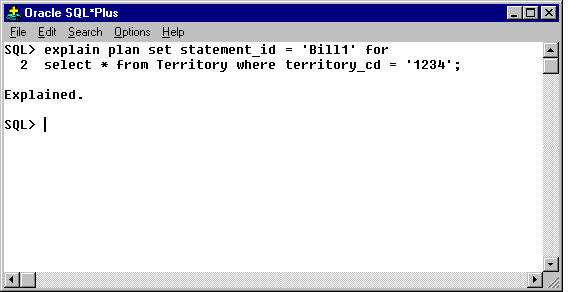
To capture the plan information for a specific query and have Oracle put it in the plan_table you use the following SQL command:
explain plan set statement_id = 'Any unique identifier' for any_valid_query
Here’s an example:
You can view the contents of the PLAN_TABLE but it’s a little inconvenient to view the results with: select * from plan_table where statement_id='Bill1' . There are a number of scripts in the public domain that format the output nicely. Here's one I put together that will work in SQL*Plus.
rem Purpose: Select execution plan from plan_table
rem Usage: @xplain STATEMENT_ID
select lpad(' ',2*(level-1))|| operation||' '||

options||' '||object_name||

' '||object_type||' '||object_instance||' '||

decode(id,0,'Cost = '||position) "Query Plan"

from plan_table

connect by prior id = parent_id and statement_id='&1'

start with id = 0 and statement_id = '&1' ;
To use it with the above example type '@xplain.sql Bill1'. Here are the results:
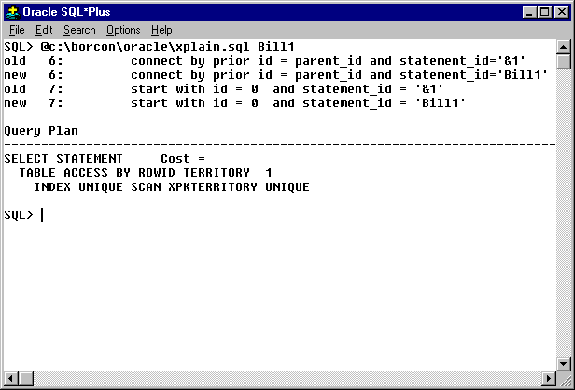
The plan shows how Oracle will execute this query. Ignore the Cost statement for the time being. The main information is that the table access will be done by row_id which is the fastest way Oracle can search a table. The row_id comes from searching the index named XPKTERRITORY which is the primary key of the table. Let’s look at the results of a similar query on a non-indexed field.
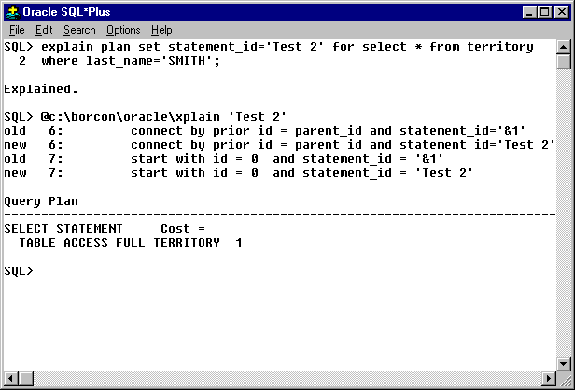
The last_name field is not indexed. The plan shows that Oracle will scan the entire table (table access full). This is a much more disk intensive query. Just like other databases, using an index allows for faster searches since indexes are optimized for searches and can often be cached in memory. If you were to frequently access this table with this query, you would want to add an index to the last_name field. Indexes speed searches and joins, but slow down updates since the indexes need to be maintained. So you don’t want to index everything. The ideas is to maximize performance by finding a balance between fields that need indexes and those that don’t.
Using the appropriate index is one of the most important things that you can do when designing and tuning your database. The explain plan tool is invaluable when doing this.
Here's a more complex query
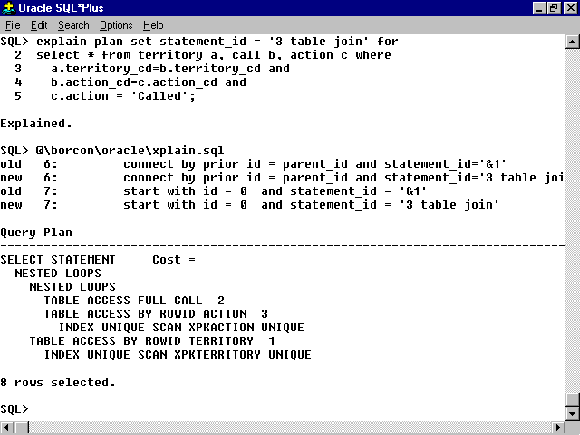
The presence of the full scan on the CALL table indicates that we should be using an index on the action_cd field involved with the join to the ACTION table. We could also add the action field to the index on the action table. These changes result in the following plan:
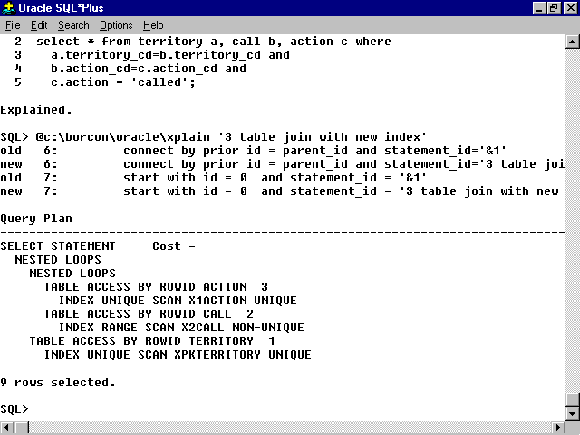
The full table scans are gone and the joins are now being done more efficiently.
Don't be discouraged if following the plan output is difficult. Deciphering the output will take time as tuning queries is almost an art form and is based on experience. Tricks for fooling the optimizers to execute queries faster abound. There are some resources where you can find more information listed at the end of this paper.
The Optimizer
How does Oracle decide how to execute queries? It has an optimizer that evaluates the SQL statement. It actually has TWO optimizers: the Rule-based optimizer and the Cost-based optimizer. Each analyzes the syntax of the query and the existence of indexes and uses calculations to determine the optimal execution plan. The Rule-based optimizer is the older of the two — supposedly it will be dropped from some upcoming release of Oracle. It is however well understood by experienced Oracle programmers and frequently makes better choices than the far more sophisticated Cost based optimizer.
The cost optimizer is enabled by compiling statistics about a table using the analyze command:
Analyze table Territory estimate statistics ;
This command analyzes the size of the table, the indexes, the distribution of values and stores that information in the system data dictionary. There are options with the analyze command to analyze tables or indexes individually as well. When you do a query involving analyzed table, the cost optimizer kicks in.
The estimate term tells Oracle just to sample the table rather than analyze the full table. The Oracle documentation indicates that the estimates are very accurate and are much faster than a full analyze. Note that once 'stats' are turned on for a table, when you modify the table, the statistics are not updated. From time to time you should refresh your stats as part of your maintenance batch processing.
When statistics are present for table in a query, the XPLAIN.SQL script will show the COST value in its output. The lower the number, the faster the query should run. I say should since the cost optimizer has always seemed buggy and is often mistrusted by experienced Oracle programmers! By the way, sometimes the cost optimizer decides to not use an index. Depending on the size of the table and the distribution of values in the index, doing a full table scan is sometimes faster than using the index.
What sometimes looks like an inefficient query, say one that relies on a full table scan, may actually be the most efficient. Depending on the distribution of values in a table, a full table scan can ultimately be faster than using an index. For example if you have an index that involves a SEX field (M or F) and most of the values in the table are ‘M’ and your query is looking for the M’s then it would probably be more efficient to look through the table itself as opposed to the index.
Incidentally, there are hints that you can use to tell Oracle to override the optimization choices. You may find yourself using them after identifying problem queries that you can't seem to otherwise optimize.
Something that we’ve seen evidence of is that queries that just do counts of records do not always use the same execution path as the straight query. That is: select count(*) from table where… may not use the same path as select * from table where…
You should also be aware that sometimes the explain plan does not give clear results. Sub queries, for example, do not always get interpreted fully. The plan may only be for the outer part of the query. Often you need to isolate the subqueries and analyze them separately.
The next section describes a common Delphi situation that results in an extremely poor choice by Oracle’s cost based optimizer.
An Optimizer Bug and Delphi?!
Here's some info about the TTable. Using DBWin or SQLMonitor to capture the SQL code BDE generates, we can see the query that the TTable uses when opened. When you open a TTable for our TERRITORY table against the server, it does (among other things) the following query (assuming there's a primary key index on the table):
SELECT * FROM TERRITORY ORDER BY TERRITORY_CD ASC.
Let’s look at the results of the explain plan for this query with statistics turned on (i.e., using the cost optimizer) versus using the old rule based optimizer:
Executing Command using cost optimizer:
"SELECT * FROM TERRITORY ORDER BY TERRITORY_CD ASC"
QUERYPLAN
--------------------------------
SELECT STATEMENT Cost = 16
  SORT ORDER BY
    TABLE ACCESS FULL TERRITORY
(it does a full table scan and actually sorts the entire table!)

Executing Command to delete stats for the TERRITORY table:
"analyze table territory delete statistics"

Executing Command using the rule based optimizer:
"SELECT * FROM TERRITORY ORDER BY TERRITORY_CD ASC"
QUERYPLAN
---------------------------------
SELECT STATEMENT Cost =
  TABLE ACCESS BY ROWID TERRITORY
    INDEX RANGE SCAN XPKTERRITORY
(The rule based optimizer is smart enough to select records back using the index alone which already sorted in the right order - this is much more efficient!)
This shows that Oracle does a much less efficient job with cost optimization for this query. When you open your TTable with cost optimization, the entire table will be sorted on the server before you get any rows back. Since the TTable always adds the ORDER BY ASC to the select statement, you could end up with a huge performance problem. The fault is not Borland's — this is probably a bug in Oracle's optimizer (we're using version 7.2 for NT).
On a 1+ million record table this can be a difference between a simple TTable.open taking 15 minutes versus 2 seconds!
So if you need statistics turned on on your database, then you should check to see what TTables can be replaced with tqueries where you can explicitly control the query. With tqueries you have full control over the SQL statement; you have little or no control over the TTable.
If you needed to access data in the same way as the TTable would, then you could use a hint in a TQuery. This forces usage of the rule optimizer:
SELECT /*+RULE*/ * FROM TERRITORY ORDER BY TERRITORY_CD ASC
Unfortunately, I know of no way to sneak this optimizer hint into the SQL a TTable generates.
Check out the Oracle documentation for more info about using hints.
Using SQL Trace and TkProf
TkProf is related to EXPLAIN PLAN. TkProf lets you capture even more information about SQL statement processing. To do this you need to enable tracing with the following SQL statement:
alter session set sql_trace = true ;
To end tracing for a session:
alter session set sql_trace = false ;
There are server configuration settings that may need to be made before you can do traces. Check the server documentation. Once you have set tracing on, Oracle will create log files in a server directory (specified in init.ora). TkProf is a utility that you use to view these log files in a readable format. The output shows all of the SQL statements your trace captured — which could be a single query or all of the queries generated by your application, — plus the execution time, the fetch time and optionally the execution plan for each query.
Tracing can be enabled for the entire Oracle instance or just the current session. You can easily add support for tracing to your Delphi application's startup as described below.
Building support for Oracle's Trace into your application
You can easily build support for the Trace function into your application. I find that this is best tied to a setting in an application specific INI file. For example:
Support.ini
[server]
trace = 1
procedure TForm1.FormActivate(Sender: TObject);
var
  Ini: TIniFile;
Begin
ini := TIniFile.Create('support.ini');
gbTrace := ini.ReadBool('SERVER', 'trace', false) ;
{gbTrace is a global variable}
if gbTrace then begin
    queryMisc.sql.clear ;
    queryMisc.sql.add( 'alter session set sql_trace = true' ) ;
    queryMisc.execsql ;
end;
Ini.Free;
end;
When you end your application you can turn off the tracing:
if bTrace then begin
    queryMisc.sql.clear ;
    queryMisc.sql.add( 'alter session set sql_trace = false' ) ;
    queryMisc.execsql ;
end;
You can then capture utilization statistics for your application. The Log files will be created on the server where you can run them through TKPROF to view them in a meaningful way as described above.
This is an invaluable tool to use to identify bottlenecks on an application wide scale. We often use Explain Plan to tune individual queries during development and then later use trace and tkprof when doing integrated testing.
Misc.
While I'm discussing application performance, if you are still having troubles after looking at your front end application and your server, you should be prepared to have someone look at the network traffic that your application creates with a network analyzer. Routers and WAN connections don’t always give the performance you expect or need.
However, your best bang for the buck in terms of wringing performance out of a system comes from tuning the front end application and the SQL server. DBWIN and SQLMonitor for the Delphi side of things and EXPLAIN PLAN and TKPROF for the Oracle side make invaluable debugging aids.
Oracle Record Locking
Oracle supports Row locking which is something developers dream about when working on a server platform whose most granular lock is a page lock. Row locking is a pessimistic lock. That means that it assumes that someone else is going to try to change the record and you intend to prevent them before they even try.
In contrast, Delphi’s optimistic lock doesn’t prevent other users from changing data. It just checks to see if anyone did when you go to apply your changes. If someone did post a change after you selected the record but before you applied your modifications, BDE gives you an error telling you so and refuses to post the changes. This is extremely annoying to users after they just finished making changes. For many situations, pessimistic locks are better because they give the programmer more control with which to protect the user and the data. But getting the row lock to work with Delphi is a little tricky.
Row locking is done via the select for update nowait syntax. It is usually done inside of a transaction. All of the records that the query returns are marked as locked by Oracle. Anyone else who tries to update, delete, or select locked records will wait until the records are unlocked. The records stay locked until the transaction is committed or rolled back. The nowait option tells Oracle to return an error if it can’t lock the record. Otherwise it will wait until the record becomes available.
The problem using row locking is that the select for Update syntax does not conform to "local SQL" syntax, which is the BDE requirement of all live queries. When you set the requestlive property to true and try to open the query , BDE gives you a ‘capability not supported error’.
Fortunately you can use two tqueries to get around this limitation. The first query selects the record and locks it: i.e. "select * from employee where emp_id = :EmpParam for Update Nowait". This query must have requestLive = false. This locks the record for the duration of the transaction. The second query is a live query that just does a "select * from employee where emp_id = :EmpParam". This is the one that you can edit.
To do this, both queries need to ‘share’ the connection to the server. This is where the "shared noautocommit" setting comes in to play. Both queries share the same transaction so you don’t lock the record from yourself. The noautocommit just implies that you will be commiting the transaction yourself and don’t want Delphi to do it automatically when you move between records. Since I always want full control over transactions, I always use ‘shared noautocommit’.
Here’s a sample of how you can perform the record lock:
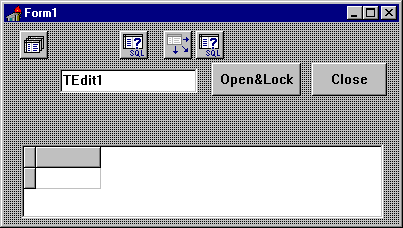
You attach this code to an ‘edit’ button or to your datasource’s onDataChange event…

procedure TForm1.OpenLockButtonClick(Sender: TObject);
begin
  { I'm not using a parameter so I can just add
    the sql statement to locking query }
  { this defines the main query }
  queryEdit.sql.clear ;
  queryEdit.sql.add( 'select * from TERRITORY where ' ) ;
  queryEdit.sql.add( ' TERRITORY_CD = ' + edit1.text );
  {clear and add the SQL statement with assign}
  queryLock.sql.assign( queryEdit.sql ) ;
  {append the locking code}
  queryLock.sql.add( ' for update nowait ' ) ;
  database1.startTransaction ;
  try
    queryLock.open ;
    queryEdit.open ;
  except on eDatabaseError do begin
    MessageDlg('Sorry, but that record is busy', mtError,[mbOk], 0) ;
    database1.Rollback ;
    raise ;
    end;
  end;
end;
You could put the locking code in the beforeOpen event of queryEdit if you like. Also, it wouldn’t be too hard to build a component that would encapsulate the locking query all together. I’ll leave that to you though!
To release the lock, just commit or rollback the transaction.
procedure TForm1.CloseButtonClick(Sender: TObject);
begin
  try
    if datasource1.state in [dsEdit, dsInsert] then
       queryEdit.post ;
    database1.commit ;
    queryEdit.close ;
    queryLock.close ;
  except on eDatabaseError do begin
    showmessage( 'Sumptin wrong' ) ;
    raise ;
    end;
  end;
One more thing
When using record locking you can safely change the TTables and tqueries to use the leanest updatemode property value: UpWhereKeyOnly. The update mode is tied to Delphi’s optimistic locking strategy - it determines how much of the record Delphi needs to use to apply an update. UpWhereAll checks every field, UpWhereChanged checks only changed values, and UpWhereKeyOnly uses only the table’s primary key.
We can safely bypass Delphi’s optimistic locking mechanism and create the most efficient update statements — those that use only the key — because we know that no one else could have changed the record since they were locked at the server level.
Client/Server Resources
There are many excellent areas on the Internet where you can get technical information of all kinds. However when I have a serious problem I don’t have time to search for answers in all of the garbage. There are several areas on CompuServe that, for my money, make it the best mode of support. Usenet is good too but there is far too much noise to filter out.
If I have a technical question I nearly always find an answer or at least others that have the same problem who might wish to join forces. E-Mail questions are client/server in their nature: If I’m stumped, I’ll post a concise description of the problem and move on to something else. That message is out there working for me while I’m on to other things. In a day or two I might have a bunch of replies! I think that public messages always yield better results than tech support phone calls. More pairs of eyes see the question as opposed to the one tech support engineer who happens to answer your call. So your odds of getting a reply are much greater. Also, the nature of e-mail is less intrusive - people can read mail when its convenient and support personnel can easily pass messages on to others if they don’t have an answer. This tends to attract the more experienced developers and engineers who’s time is more valuable.
Online Support
Internet
Borland now has a USENET server located at FORUMS.BORLAND.COM. Look on the Borland website (
http://www.borland.com) to see information about accessing their newsgroups.Oracle has also ramped up their support on the internet. Their new online support is web based. Check out
http://www.oracle.com for more information.
CompuServe
GO DELPHI
Both the users as well as Borland personnel made this the primary support area for Delphi in the past. With Borland moving their support to their usenet server this resource will undoubtably change.
GO BDEVTOOLS (Borland developer tools)
There’s various developer tool sections here including the Paradox Engine, Interbase, Brief and Java tools. But the most useful area for C/S is the BDE and SQLLinks sections.
GO ORASUP
This forum is run by Oracle and access to it is controlled by the sysops. Until recently you needed to be the designated contact for an expensive support contract before being allowed to access this forum. Now they seem to let in anyone who’s company has a support contract. The level of technical support is excellent as there are a number of experienced Oracle engineers on-line. Forum members are regularly sent e-mail bulletins from Oracle about bugs, updates, and support information.
GO ORAUSER
This forum is not run by Oracle but still has a good amount of technical information. There are more third party files available in the file libraries than in ORASUP.
Microsoft Forums
Microsoft has recently abandoned CompuServe as their primary means of technical support. They sold the forums to a third party. Developers seem to have left in droves. Messages frequently go unanswered. Message libraries are a good source of third party files however.
The good news is that Microsoft has moved their support to the Internet. The bad news is that it’s very popular! Their news server is publicly accessible at
MSNEWS@MICROSFT.COM
Microsoft offers a free newsgroup reader that you can use as a front end to their support server.
Other excellent forums are the consultants forum (GO CONSULT), DBMS Magazine (GO DBMS), Databased Advisor (GO DBADVISOR), Sybase (GO SYBASE)
Books
These books are highly recommended:
Oracle Backup and Recovery Handbook, Rama Velpuri, Oracle Press, 1995
Oracle DBA Handbook, Kevin Looney, Oracle Press, 1995
Oracle Performance Tuning, Peter Corrigan and Mark Gurry, O’Reilly and Assoc, 1993
Oracle PL/SQL Programming, Steven Feuerstein, O’Reilly and Assoc, 1995